Pages

Wednesday, March 12, 2014

All about R

SIMPLE Variable assignment and use of FUNCTIONS
 a<-4 nbsp="" p="">a/2=2
a*2=8
b<-1 nbsp="" p="">a+b=5, a-b=3, b-a=-3
sin(a), cos(b)
a==b False or F
a>b TRUE or T

VECTOR
Null in SQL= NA in R
sum(a, na.rm=True) will add all values without NA
x<-c p="">names(x)<-c asters="" br="" college="" school="">
plot(x)
y<-1:4 p="">print(y) 1,2,3,4

MATRIX
create matrix
matrix(1,3,4) corresponds to matric(value in each column, rows, columns)
A<-matrix p="">contour(A) -----creates a graph for matrix so its easily readable

3D prespective plot:
persp(a)

3D perspective with less expansion
persp(a,expand=0.2)

R includes some sample data sets to play around with. One of these is volcano, a 3D map of a dormant New Zealand volcano.

contour(volcano)
persp(volcano, expand=0.2)
image(volcano) ------image function create a heat map 

SUMMARY STATISTICS
http://www.ltcconline.net/greenl/courses/201/descstat/mean.htm


  • Average value (mean)=sum(n)/n
  • Most frequently occurring value (mode)
  • On average, how much each measurement deviates from the mean Formula
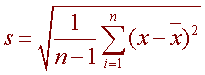
    Variance and Standard Deviation: Step by Step 
    Calculate the mean, x.  
    Write a table that subtracts the mean from each observed value.
    Square each of the differences.
    Add this column. 
    Divide by n -1 where n is the number of items in the sample  This is the variance.
    To get the standard deviation we take the square root of the variance.  
 finally, Mean+sd and mean-sd is the range in which the values should lie, other are outliers.
  • Span of values over which your data set occurs (range), and
  • Median= average of two middle values when ordered asc or desc in series (this value gives a better and robust idea of an average than mean, since it does not take outliers in consideration)

mean(volcano)
barplot(x)
> limbs<-c br="">> mean(limbs) 3.428571
> names(limbs)<-c br="" five="" four="" one="" seven="" six="" three="" two="">> barplot(limbs)
> abline(h=mean(limbs)) --horizon
median(limbs) = 4
sd(limbs) =0.7867958
abline(h=mean(limbs)+sd(limbs),lty"dotted",col="red")
abline(h=mean(limbs)+sd(limbs))

Factors

Data Frames

type<-c gems="" gold="" p="" silver="">weight<-c p="">prices<-c br="">

> treasure <- code="" data.frame="" prices="" types="" weights=""> 
> print(treasure) 
 
    weights prices  types
1     300   9000   gold
2     200   5000 silver
3     100  12000   gems
4     250   7500   gold
5     150  18000   gems

treasure[[2]]= treasure[["prices"]] = treasure$prices
[1]  9000  5000 12000  7500 18000 

Read files

read.csv("C:\\Program Files\\R\\targets.csv") 
read.table("C:\\Program Files\\R\\Infantry.txt",sep="\t")
read.table("C:\\Program Files\\R\\Infantry.txt",sep="\t",header=TRUE)
 
 
 plot(countries$GDP,countries$Piracy)
 
 cor.test(countries$GDP, countries$Piracy)
Pearson's product-moment correlation

data:  countries$GDP and countries$Piracy 
t = -14.8371, df = 107, p-value < 2.2e-16
Conventionally, any correlation with a p-value less than 0.05 is 
considered statistically significant, and this sample data's p-value is 
definitely below that threshold. In other words, yes, these data do show
 a statistically significant negative correlation between GDP and 
software piracy.   
 
 If we know a country's GDP, can we use that to estimate its piracy rate?
We can, if we calculate the linear model that best represents all our data points (with a certain degree of error). The lm function takes a model formula, which is represented by a response variable (piracy rate), a tilde character (~), and a predictor variable (GDP). (Note that the response variable comes first.)
Try calculating the linear model for piracy rate by GDP, and assign it to the line variable:
 line <- b="" countries="" iracy="" lm="">
 
Other statistical packages that can be added to R
install.packages("ggplot2") 
 

Tuesday, March 11, 2014

Hortonworks Hadoop

Sharing an awesome post on starting and setting up Hortonworks to learn Hadoop:
http://codegumbo.com/index.php/2014/02/24/first-few-bites-of-the-elephant-working-with-hortonworks-hadoop/
I just set everything up on my Windows8 core i7 HP laptop. One step I had to do extra was boot into the system and turn virtualization bit on and after that everything ran like magic.


Tuesday, April 23, 2013

Fix Untrusted Foreign keys

Going off of Brent Ozar's note on fix untrusted foreing keys here:
http://www.brentozar.com/blitz/foreign-key-trusted/
He explains how the optimizer cannot use untrusted Fk's to generate query plan and hence can lead to suboptimals plans getting selected and hence slowness.
we decided to work on untrusted foriegn key contraints in our system to get performance improvements if any. With a system of hundreds of dbs below is the query I came up with. For finding untrusted fks and also the count of records that did not satisfy the FK constraint (if any i.e. values in child table which were not in parent table). For those the records needed to be fixed before fixing the untrusted FK's.

This was run on all dbs at once using registered server and results copied to excel


CREATE TABLE #temp
    (
      servername NVARCHAR(500) ,
      dbname NVARCHAR(500) ,
      parenttable NVARCHAR(500) ,
      RefTable NVARCHAR(500) ,
      FKName SYSNAME ,
      keyname NVARCHAR(1000) ,
      PTForeignKeyColumn NVARCHAR(500) ,
      RTForeignKeyColumn NVARCHAR(500) ,
      cntStmt NVARCHAR(MAX) ,
      cntnotexistsRecords INT NULL
    )

--select top 1 * from sys.foreign_key_columns
EXEC sp_msforeachdb N' USE [?]
INSERT INTO #temp(servername,dbname,parenttable,RefTable,FKName,keyname,PTForeignKeyColumn,RTForeignKeyColumn,cntStmt,cntnotexistsRecords)
SELECT DISTINCT @@servername AS servername, DB_NAME() AS dbname,OBJECT_NAME(i.parent_object_id) AS parenttable,OBJECT_NAME(i.referenced_object_id) AS RefTable,i.name AS FKName,
''ALTER TABLE ['' + s.name + ''].['' + o.name + ''] WITH CHECK CHECK CONSTRAINT ['' + i.name + '']'' AS keyname,
(SELECT
    c.name + '',''
FROM
    sys.columns c where fkc.parent_object_id = c.object_id AND c.column_id IN (select fkc2.parent_column_id FROM sys.foreign_key_columns fkc2 where i.parent_object_id = fkc2.parent_object_id AND i.referenced_object_id=fkc2.referenced_object_id and i.object_id=fkc2.constraint_object_id)
                                 FOR XML PATH('''')) AS PTForeignKeyColumn,
(SELECT
    c.name + '',''
FROM
    sys.columns c where fkc.referenced_object_id = c.object_id AND c.column_id IN (select fkc2.referenced_column_id FROM sys.foreign_key_columns fkc2 where i.parent_object_id = fkc2.parent_object_id AND i.referenced_object_id=fkc2.referenced_object_id)
                                 FOR XML PATH('''')  ) AS RTForeignKeyColumn,
'''' AS cntStmt,NULL AS cntnotexistsRecords
from sys.foreign_keys i
INNER JOIN sys.objects o ON i.parent_object_id = o.object_id
INNER JOIN sys.schemas s ON o.schema_id = s.schema_id
left JOIN sys.foreign_key_columns fkc ON i.parent_object_id = fkc.parent_object_id AND i.referenced_object_id=fkc.referenced_object_id
 WHERE i.is_not_trusted = 1 AND i.is_not_for_replication = 0
and i.is_disabled = 0
AND DB_NAME() not in (''master'',''msdb'',''tempdb'',''dfwr_th'',''model'',''mmshare'',''distribution'')
;'


/** Create untrusted-mismatched records count statement **/
UPDATE  t
SET     cntStmt = 'Select @cnt_OUT = COUNT(DISTINCT '
        + REPLACE(t.PTForeignKeyColumn, ',', '') + ') FROM  [' + t.dbname
        + '].[dbo].[' + t.parenttable + '] WHERE '
        + REPLACE(t.PTForeignKeyColumn, ',', '') + ' NOT IN (SELECT '
        + REPLACE(t.RTForeignKeyColumn, ',', '') + ' FROM [' + t.dbname
        + '].[dbo].' + t.RefTable + ')'
FROM    #temp t
WHERE   ( LEN(t.PTForeignKeyColumn) - LEN(REPLACE(t.PTForeignKeyColumn, ',',
                                                  '')) ) = 1


/* CURSOR through to execute statement to get mismatched/untrusted record counts */
DECLARE @dbName SYSNAME ,
    @parentbl SYSNAME ,
    @reftbl SYSNAME ,
    @fkname SYSNAME ,
    @sqlStmt NVARCHAR(500);
DECLARE @ParmDefinition NVARCHAR(200)


DECLARE cntcursor CURSOR
FOR
    SELECT  dbname ,
            parenttable ,
            reftable ,
            fkname ,
            cntstmt
    FROM    #temp
OPEN cntcursor
FETCH NEXT FROM cntcursor
INTO @dbName, @parentbl, @reftbl, @fkname, @sqlStmt

WHILE @@FETCH_STATUS = 0
    BEGIN
        DECLARE @cnt INT

        SET @ParmDefinition = N'@cnt_OUT int OUTPUT'

        EXECUTE sp_executesql @sqlstmt, @ParmDefinition,
            @cnt_OUT = @cnt OUTPUT;


        UPDATE  #temp
        SET     cntnotexistsRecords = @cnt
        WHERE   dbname = @dbName
                AND parenttable = @parentbl
                AND RefTable = @reftbl
                AND FKName = @fkname

        SET @cnt = 0

        FETCH NEXT FROM cntcursor
INTO @dbName, @parentbl, @reftbl, @fkname, @sqlStmt
    END

CLOSE cntcursor
DEALLOCATE cntcursor

SELECT  *
FROM    #temp
ORDER BY dbname
DROP TABLE #temp

/*
while doing the last select * from #tempdb, you can do a where cntnotexistsRecords=0 (to get only the records which satisfy the FK's) and cntStmt != NULL ( to get values where FK relationship do not involve more than one column, because I have refrained from creating a count statement for FK's involving multiple columns) This query is designed for Fk's with only one column
*/

Monday, November 5, 2012

SQL hardware configuration

As a DBA as much as knowledge of query tuning and indexing and maintenance is important, so is important the other aspect i.e. Disk I/O configuration. Because sometimes how much ever you tune the query the problem lies elsewhere.

Raid 0: should generally be never used for SQL server
Raid 1: Mirrors data: provides protection from loss of data
Raid 5: stripping with Parity
Raid 6:stripping with double distributed Parity
Raid 10: stripped pair of mirrors
Raid 01: mirrorred pair of strips

For read-only data raid 5 or 6 are good

For heavy writes or OLTPs raid 1+0 is a good choice though expensive

Raid 1 is a good choice for transaction log which are mostly written to continuously

tempdb since is mostly writes Raid 1 or raid 1+0 is good option. Or else the RAM or any other specialized hardware is too.
Direct attached storage (DAS): disk are attached/built into server chasis and hence dedicated to each server. Easy assembly as well as performace troubleshooting. No support for failover clustering, disk array snapshots, cross data center or array based replication.

Storage Area networks (SAN):  Shared storage usage btween multiple servers. Ensures maximum use of storage space.
Since the sytem is complex, performance troubleshooting becomes difficult

Wednesday, October 31, 2012

Memory Management

This is excerpt from memory management chapter of book Troubleshooting SQL Server, A guide for accidental DBA (Some notes I put together from the chapter for self help: This chapter in the book is a wonderful read.)

No memory leak- SQL Server keeps all the memory allocated to it, whether it uses it or not. It does not return memory if the memory is not in use. So basically it looks like there is a memory leak. PS: SQL server will not release this memory unless the OS sets memory low resource notification flag, which indicates SQL server to release its memory allocations. While the memory high feature lets SQL Server know that it can grow to use additional memory. (A dedicated thread was introduced in SQL 2005 to monitor these memory notifications)

SQL      64 bit                                          SQL  32bit

Windows 2008                       OS limit 32 GB                                    limit  4GB --(enabling AWE helps SQL use additional memory unto 64gb)

SQL 2000 enterprise or SQL 2005 standard and above only has AWE enabling feature. SQL 2000 standard edition and below don't have this feature. (PS*: Remember, If the RAM or physical memory is less than 32GB then accordingly the SQL will have an upper limit which is less that the physical memory available. The above examples are based on RAM being around 64gb)

SQL Server 32 bit:

  • Memory allocation: 2GB to User Mode VAS and 2GB to Kernel Mode VAS though Windows assigns it a complete of 4GB to operate. Out of 2GB User mode: most of it is buffer pool memory, and some is non-buffer pool memory.

  • Buffer pool memory: SQL server calls VirtualAlloc function in WinAPI to allocate memory to itself. (VirtaulAlloc returns 32bit pointer which limits amount of usermode VAS to 2GB) Buffer pool memory allocations are for data pages and execution plans. This memory is pageable by Windows.

  • Non-buffer pool memory allocations: Thread stack allocations, heap allocations, exteded stored procs, SQLCLR, linked servers, backup buffers. SQL Server calculates this MemToLeave which is: MaxWorkerThreads * 0.5MB + default revervation (256MB) where MaxWorkerThreads = (ProcessorCount-4)+256  (generally comes to about 0.4GB) Generally buffer pool will not require more memory than this, but incase this memory becomes Fragmented and there is not enough contingeous memory available, the amount of VAS reserved can be increased using -g 256> startup parameter. In 64-bit SQL, VAS is 8TB, greater than allowable physical RAM on a windows server, so this issue does not exist.
    So for 2GB user mode VAS: 1.6Gb is buffer pool and 0.4 GB is non-buffer pool memory.

  • To allow 32-bit SQL to use more buffer pool memory 2 options exist:
    1.VAS tuning (available for Windows server with 4GB memory-RAM) -use with extreme caution, since here you are taking away about 1GB of Kernel VAS and trying to allocate to User VAS. In most cases avoid!
    2. enabling AWE -Address Windowing Extensions (for greater than 4GB RAM).  AWE is used to extend Buffer pool User memory. It requires additional configuration of the OS to use Physical Address Extensions (PAE). When PAE is enabled, the 32 bit memory management pointer is exapanded to 36-bit allowing OS to address 64GB of RAM or RAM's upper limit. For applications to make use of this additional memory they must use AWE. Thus instead of calling VirtuallAlloc, now SQL Server calls AllocateUserPhysicalPages function in Windows to allocate memory. This is non-pageable  by Windows.
    To use AWE, PAE is enabled in Windows 2008 using BCDEdit /set from command prompt. Next, 'awe enabled' sp_configure option is set in SQL server and SQL Server service account must have Locak Pages in Memory user right (assigned using Windows Group Policy Tiil, gpedit.msc). Restart SQL server required after enabling this. 'max server memory' sp_configure option used to set max memory allowed for AWE eg: 4gb to (MAX RAM not recommended), any memory that we think is required by SQL server.Since this is non-pageable memory, Windows OS cannot get this locked memory back if it needs it, so be careful while assigning AWE memory limit.


SQL Server 64 bit:

  • In 64-bit SQL, VAS is 8TB for Kernel mode and 8TB for user mode, greater than allowable physical RAM on a windows server. Hence, AWE enabled bit has no use in 64-bit SQL. But Lock Pages in Memory option still exists.

  • Also, since there is so much memory, The MemtoLeave for non-buffer pool and -g startup parameter also has no significance in 64-bit. But you have to manually monitor to ensure that Memory/Available Mbytes (non-buffer pool memory) remains abover 300MB as we gradually increase value of max server memory.

  • Configuring memory through Min Max server memory bits(via SSMS or sp_configure): Mim server memory is minimum size to which SQL server can shrink buffer pool when WIN memory is under pressure. Max server memory is how much maximum memory a buffer pool can use). Min Server memory should always be set much lower than max memory (If min and max are set to same(not recommended!), we are intentionally locking pages in memory which will limit how much space SQL can free up for windows when windows hits low memory)(More on how to lock pages in memory:http://msdn.microsoft.com/en-us/library/ms190730(v=sql.105).aspx)


Diagnosing Memory pressure: low memory allocated to SQL means more pages to get from disk, means more physical IO and poor performance. Results in continuous buffer pool flushing called buffer pool churn.

SQL Server: Buffer manager\Page Life Expectancy: (time in seconds that a page exists in cache): This counter must be monitored over long periods of time in order to properly identify normal trends and away from normal value.

Free List Stalls/sec > 0 frequently, indicates memory pressure. If free pages counter is near to or is 0 and PLE drops at the same time means memory pressure.

Monday, September 10, 2012

Find and drop unused indexes across multiple servers

So we have a system with about 300+ dbs across 20 servers and all of the databases are identical. Each db represents a client.

/*
This query is used to find index, seeks, scans, lookups and updates across all tables in all  dbs on all servers.
criteria for unused indexes is seeks+scans+lookups<10
the index should not be unique or clustered
and table type is not a heap.

Run the below mentioned query across all servers using registered servers. It uses EXEC sp_msforeachdb to run query on each db
*/
CREATE TABLE #UnusedIndexes
(dbName sysname,
tablename sysname,
indexname sysname,
seeks BIGINT,
scans BIGINT,
lookups BIGINT,

updates BIGINT,
lastseek DATETIME,
lastscan DATETIME,
TotalSeeksScansLookups BIGINT,
SizeInKB BIGINT)


EXEC sp_msforeachdb N' USE [?]

INSERT INTO #UnusedIndexes
SELECT  DB_NAME(),o.name ,
i.name,
u.user_seeks,
u.user_scans,
u.user_lookups,
u.user_updates,
u.last_user_seek,
u.last_user_scan,
u.user_seeks+
u.user_scans+
u.user_lookups TotalSeeksScansLookups,
reserved_page_count * 8
FROM    sys.indexes i
JOIN sys.objects o ON i.object_id = o.OBJECT_ID
LEFT JOIN sys.dm_db_index_usage_stats u ON i.object_id = u.object_id
AND i.index_id = u.index_id
AND u.database_id = DB_ID()
LEFT JOIN sys.dm_db_partition_stats ps ON u.index_id = ps.index_id AND u.object_id = ps.object_id

WHERE   o.type <> ''S''
--and isnull(u.user_updates, 0) > 0
and i.type_desc <> ''HEAP''
AND ISNULL(u.user_seeks,0)+
ISNULL(u.user_scans,0)+
ISNULL(u.user_lookups,0) < 10
AND is_unique = 0
AND i.type_desc = ''NONCLUSTERED''
--  AND o.name = '''' AND i.name=''<indexname>''
AND DB_NAME() LIKE ''%_<type>''
;

'

SELECT * FROM #UnusedIndexes

DROP TABLE #UnusedIndexes

Once you get the output, put it in excel or a sql table for further queries

----determine the total number of databases in the system with similar schemas (in ours its  --301 dbs)
SELECT *
FROM sys.databases WHERE name LIKE '%%_<type>' AND
name NOT IN ('master','tempdb','model','msdb','MMDB','pubs','Northwind','mmdb','MMShare')--301  dbs

/*
Here, I have imported the data to a table called UnusedIndexes and ran the count query below:
--wherever the noofoccurences match the total number of stage dbs that is 301 for this run
AND the user seeks, scans and lookups are 0 or very minimal/negligible as compared to updated
means none of the stage database is using this INDEX
Hence the index can be deleted across all  dbs.

Incase of user seeks,scans,lookups and updates being null, does not give us much information..so we will have to go through each of the index usage and figure out whether to keep or delete it.
*/
SELECT tablename,indexname,COUNT(indexname) AS noofoccurences,SUM(totalSeeksScansLookups) as totalSeeksScansLookups,
SUM(updates) AS Totalupdates,sum(sizeinKB)/1000/1000 AS sizesavingsacrossAllinGB
from [dbo].[UnusedIndexes]
GROUP BY tablename, indexname
HAVING COUNT(indexname) >300
ORDER BY sum(sizeinKB) desc
/* As you begin deleting the indexes you might see a significant decrease in db size. This will also help the CPU since those many lesser indexes need to be updated and maintained.

After the above query run keep changing the --HAVING COUNT(indexname) >275 (and see how many more indexes it gives)


Sometimes an index is picked up by optimizer by mistake and hence shows up as used in a few databases. If that is the behaviour you see, those indexes can be dropped as well, unless you put that index in specifically for a large database or for a particular query.
*/

Be very careful dropping any index. Double check to see its not unique or clustered. We saw savings of approx total 50GB across all servers.

Friday, March 30, 2012

msdb cleanup

Recently I had to implement a job to remove msdb mail history and backup history.
We do daily build emails and full and differential backups. Though this does not increase the size of msdb to great extent it might grow considerably over a few months or year or so.

For mail cleanup, I got a tip from the following article:
http://www.mssqltips.com/sqlservertip/1732/sql-server-database-mail-cleanup-procedures/


1) To delete mail history.
We needed to keep upto 2 weeks of old data,
But not delete more than 3 months of data at a time, since that might block up msdb.

DECLARE @MinSentDate DateTime
select @MinSentDate=MIN(sent_date) from sysmail_allitems
DECLARE @DeleteBeforeDate DateTime
Set @DeleteBeforeDate = (Select DATEADD(mm,3, @MinSentDate))
if(dateadd(DD,-14,getdate())<@DeleteBeforeDate)
Begin
set @DeleteBeforeDate=dateadd(DD,-14,getdate());
End
Print @DeleteBeforeDate
--To delete messages with any/all sent status
EXEC sysmail_delete_mailitems_sp @sent_before = @DeleteBeforeDate, @sent_status='sent'
EXEC sysmail_delete_mailitems_sp @sent_before = @DeleteBeforeDate, @sent_status='unsent'
EXEC sysmail_delete_mailitems_sp @sent_before = @DeleteBeforeDate, @sent_status='retrying'
EXEC sysmail_delete_mailitems_sp @sent_before = @DeleteBeforeDate, @sent_status='failed'
EXEC sysmail_delete_log_sp @logged_before = @DeleteBeforeDate
Print 'Mail history deleted before:'
Print @DeleteBeforeDate


2)To delete backup history
We do full backups every sunday and differential backups for the rest of the week.
Hence it was necessary to delete backup before sunday two weeks ago, since here again we wanted to keep two weeks worth of data.
Also, we did not want to delete more than 3 months of data at a time.


DECLARE @TodayDayOfWeek INT
DECLARE @StartOfPrevWeek DateTime
DECLARE @deletedate DateTime
SET DATEFIRST 1

--get number of a current day (1-Monday, 2-Tuesday... 7-Sunday)
SET @TodayDayOfWeek = datepart(dw, GetDate())
--get the sunday of the previous week
SET @StartOfPrevWeek = DATEADD(dd, -(@TodayDayOfWeek+7), GetDate())
--since Sunday is full backup day, we choose saturday
SET @deletedate = @StartOfPrevWeek-1

DECLARE @minbkdate DATETIME;
SET @minbkdate = (SELECT MIN(backup_start_date)
FROM backupset WITH (nolock));
print @minbkdate
SET @minbkdate = (SELECT dateadd(mm,3,@minbkdate));


IF (@deletedate < @minbkdate )
BEGIN
SET @minbkdate = @deletedate;
END;

Exec sp_delete_backuphistory @minbkdate
Print 'Backup history deleted before:'
PRINT @minbkdate


These 2 steps were put in a job and scheduled to run weekly.

Thursday, August 4, 2011

System.OutOfMemoryException Error

So we had this long running query run by an internal developer to process data. This query had a cursor and output a bunch of stuff after every record was processed. And after a point the query failed with following:

Probably the data out output in SSMS window was too much too handle.
Online solutions do suggest putting the query in a file and then running the file using SQLCMD. Instead here, we created a temporary sql agent job on that database. Dumped the SQL in the job and output data to a text file. The query ran really fast and we had all the data we needed.

Slow running query

We recently got a call from one of our developers that they had a slow running application on one of the databases. It was a lot longer than usual and with this rate they were estimating nearly a day of processing as compared to their usual couple of hours.

First: I ran the sp_whoisactive (an awesome proc by Adam Machanic) and sp_who2 to see is there was any blocking or long running query on the server. After that was ruled out.
Second, I started the activity monitor for that server in SSMS. That showed the processor time and recent expensive queries. As was evident our query was in there.
Thirdly, I started the SQL profiler to trace and get a few paramters on running query. The reads, writes and the duration column in the profiler easily led us to the proc in the application that was running the slowest.
It also showed that this part of the application was being run very frequently as might be the processing need. Since the number of iterations * time taken was proving costly for it, we decided to tune that query.

Again back to the great sp_whoisactive @get_plans=2 (or @get_plans=1),
we were able to catch the exact execution plan for that proc. The query plan was doing a index scan where it was to do a clustered seek and key lookup. It had the necessary index, but did not look like using it. We looked at query plans in other databases and they looked like they had an index seek and key lookup, which made us sure of our assumption. The database needed updated statistics to generate the correct query plan.
We ran the sp_updatestats on that database and the duration for that part of the query came down from half a minute to 10 milliseconds, taking it back to its original time. The processing finished within a couple of hours.

Tuesday, August 2, 2011

So we have a corrupt database

When a developer started to run a query the other day he got error:
SQL Server detected a logical consistency-based I/O error: incorrect pageid (expected 6:16547936; actual 0:0). It occurred during a read of page (6:16547936) in database ID 15 at offset 0x00001f900c0000 in file '.....SampleDB_4_data.ndf'. Additional messages in the SQL Server error log or system event log may provide more detail. This is a severe error condition that threatens database integrity and must be corrected immediately. Complete a full database consistency check (DBCC CHECKDB). This error can be caused by many factors; for more information, see SQL Server Books Online.

So we checked the databaseID=15 which was SampleDB on the server and ran the
DBCC CHECKDB ('SampleDB') WITH NO_INFOMSGS
go

output:
Msg 8978, Level 16, State 1, Line 1
Table error: Object ID 80719340, index ID 1, partition ID 72057594103136256, alloc unit ID 72057594106806272 (type In-row data). Page (6:16547927) is missing a reference from previous page (6:16547928). Possible chain linkage problem.
Msg 8928, Level 16, State 1, Line 1
Object ID 80719340, index ID 1, partition ID 72057594103136256, alloc unit ID 72057594106806272 (type In-row data): Page (6:16547928) could not be processed. See other errors for details.
.
.
.
Msg 8980, Level 16, State 1, Line 1
Table error: Object ID 80719340, index ID 1, partition ID 72057594103136256, alloc unit ID 72057594106806272 (type In-row data). Index node page (6:16585523), slot 15 refers to child page (6:16547950) and previous child (6:16547951), but they were not encountered.
Msg 8928, Level 16, State 1, Line 1
Object ID 80719340, index ID 1, partition ID 72057594103136256, alloc unit ID 72057594106806272 (type In-row data): Page (6:16547951) could not be processed. See other errors for details.

Msg 8976, Level 16, State 1, Line 1
Table error: Object ID 80719340, index ID 1, partition ID 72057594103136256, alloc unit ID 72057594106806272 (type In-row data). Page (6:16547951) was not seen in the scan although its parent (6:16585523) and previous (6:16547952) refer to it. Check any previous errors.
CHECKDB found 0 allocation errors and 49 consistency errors in table 'SampleTable' (object ID 80719340).
CHECKDB found 0 allocation errors and 73 consistency errors in database 'SampleDB'.
repair_allow_data_loss is the minimum repair level for the errors found by DBCC CHECKDB (SampleDB).


--Since it suggested running repair_allow_data_loss we wanted to find out what data we were going to loose. We did not have a backup of the database, since it was not one of our production databases.
So we ran
DBCC TRACEON (3604)
go
DBCC PAGE(SampleDB,6,16547952,2) --parent page
DBCC PAGE(SampleDB,6,16585523,2) --previous page
DBCC TRACEOFF(3604)
go
This puts out a lot of information, the most important being Metadata: IndexID. If this value is greater that 2, the non-clustered index on table is corrupt and needs to be dropped and recreated thus without any loss of data.

If the value is less than 2, which was in our case, it meant the primary key/clustered index was corrupt. There is not easy way to drop and recreate index and doing so will definitely result in loss of data. We did not have a backup of database, since this was internal reasearch database. Hence the other option left for DBCC CHECKDB('SampleDB', REPAIR_ALLOW_DATA_LOSS). Run repair data loss would remove the corrupt pages and re-allign the indexes to point to the correct ones.

For this first take a full backup of corrupt database, then bring the database in simple mode and then run the REPAIR_ALLOW_DATA_LOSS command.

Once that was run, the corrupted pages were got rid of and the database was put back in multiuser mode for everyone to use.
The next day, yes you guessed it right, they wanted the lost records back. Thanks to the foresight of my manager of taking a backup, we restored the corrupt database as SampleDBCorrupt.
The unique key was the primary key to get the records. But we were not able to query the corrupt database with Primary key, since the primary key clustered index was corrupt.
So we selected the non-clustered index which had maximum columns (from primary key). This was so that we could get as unique a record as possible while still forcing the corrupt database to use a secondary index. Those lost set of values were acquired running an except command across the 2 databases. These were only partial values of the columns in the index. We were able to put them in table and match it up with an older datamart to get all values. Luckily our corrupt data was from year 2004 and we were easily able to retrieve it without any loss. The retrieved records were then inserted into our repaired db SampleDB.

Take a look at a good link I found online from sql server pro on details of dbcc:
Also, Paul Randall's blogs are one of the best source on DBCC topics.

Thursday, July 21, 2011

Redgate schema compare

We have a system of about 300+ databases which the way the applications are designed need to be identical. Our releases include releasing objects to all the databases. But once in a while we have a production requirement or issue and have to roll out a hotfix to a particular database. You know how exciting DBA jobs get once a while and thus we tend to forget releasing those few objects to all other databases.

Hence, for that reason we wanted a database schema compare job to be run once a month or week.

Recently we bought Redgate developer suite and loved the capability to integrate with SSMS.
Also, its database schema compare was much faster than any other tools I have used previously. Along with that it also offered the capability to do source control and database compare, which we had been looking for a while.

Thus to automate the compare process, we decided to use the Redgare sql compare commandline features.
Here is a sample of what options were used/ignored and what switches were used to include and exclude objects:

1. echo Start Compare %date% -%time% >>C:testlog.txt

2. cd "C:Program FilesRed GateSQL Compare 9"
SqlCompare /S1:server1 /db1:baseDatabase /S2:server2 /db2:databaseToCompare /Exclude:Schema /Exclude:User /Exclude:Role /Options:Default,IgnoreComments,IgnoreConstraintNames,IgnorePermissions,
IgnoreFillFactor,IgnoreWhiteSpace,IgnoreQuotedIdentifiersAndAnsiNullSettings,
IgnoreWithNocheck >>C:testlog.txt

3. echo End Compare %date% -%time% >>C:testlog.txt

As you can see, the 1st and the 3rd statement is used to get time estimates for comparison. For us it took only about 40 minutes to go through 300+ databases, which is impressive for the kind of work this tool is doing in each database.

The 2nd statement is where the actual command is either run in windows command prompt or put in a bat file. As you can see it first changes directory to where sqlcompare.exe lies and then runs the compare across server1-database1 and server2-database2.

/Exclude is a switch used in comparison which lets us exclude comparison for certain objects, as in our case like user, role and schema. But you can also exclude to the level of tablename which is really cool aspect.
More information on switches can be found at:
Switches

/options are options in option tab you see in the SQL Schema compare Gui. You can use it to Ignore Permissions, whitespace, FillFactors etc during comparisons which may not be that important during the first run.
More information on options is at:
Options

The way we designed it it I ran the SQL comapre across two same databases, from GUI and commanline using same set of options at a time. Then adding more options as needed. This way I cud get the exact same result in commandline as in Gui.

We wanted this as a step by step process and initially we compared only Procedures, functions, views and tables fixing them across all databases.
Second iteration we compare only tbales and constraint names, because we had hundreds of system named default constraints and renamed them appropriate and same across all databases.

Needless to say before doing any of the object changes across all databases, we send them to our software developers for a quick review and released it using regular release process.

Saturday, July 9, 2011

Tempdb on separate drive on server

Case study:
How many times have we heard that tempdb should be on a fast cache drive? Thus to start with we had put tempdb files along with mdf files on fast drive. While the ldf's for the databases were on separate drive. This worked very well till SE's started writing queries to process data for internal use growing the tempdb mdf. Or when we had to load months of data in a database to resolve some issue growing its mdf out of limits and that choked that drive.

Thus we decided to shift tempdb to its own fast cache read write drive T:. On an average our tempdbs required only about 5 GB space. But once in a while shot unto 100 GB during some manual processing. What our Operations team decided was to let tempdbs of various servers each be on T: drive on the servers and share the same pool of space common to all. That pool being about 100GBs. The logic behind this was, when data was processed for one database, not necessarily other databases would also process that amount of data as well. So at a time even if one tempdb grew a lot it could use up 60-80GB and shrink back when the processing is over.
Thus that saved a lot of space given to each tempdb on each server if they were kept separate and had to be given 100GB each. It also helped since tempdb being on separate drive did not cause a bottle neck on the mdf drives, thus not slowing down other production queries. This resulted in faster data retrievals for client applications.

Friday, July 8, 2011

Deleting data from heap table

We started running out of space on a few of our servers. Adding more space is an easy getaway, but everyone knows the perils of throwing more and more hardware to solve space issues. So determined to use the available space, we decided to look at any particular tables which had a lot of data and could be deleted or archived. We figured that there was a heap table used in every databases, in some as big as 200GB, which had data from when the system had started. Also new data was being added to that table everyday. After careful consideration of keeping back dated data upto one year and deleting the rest since we had flat files of data over many years which could be loaded if required, we decided to delete the data from heap.
The data was deleted in batches since the table was continuously used and we din't want to lock it down for long time. But as everyone knows the major issue with deleting data from a heap is the data is deleted but pages are not deallocated, unless you do a rebuild or have an index over it or delete with a TABLOCK.
Creating an index though an option was not going to work for us, since it would take nearly as much space as heap. We did not have that much space on server. Rebuilding also took a lot of space and hence with only a few GB remaining even this was not an option.

So for the time being we decided to delete 500 rows at a time with TABLOCK option. With TABLOCK, the delete acquires a lock on the table and deleted data as well as deallocates the pages. So we planned to run and monitor this so as to not have other queries wait on it and detect blocking early on.

Once we got a lot of space back and the heap had only one year of data in all databases, we decided to create a new table with index and have the queries use this and delete the heap.
The other option was to use a compressed table while doing so, so that the space required for a years data would be pretty less.
We decided to drop the heap once the new table was in place and data from heap was transferred to it.
Next, we put a job in place which would run weekly or monthly and delete data from the table, so that the table remained manageable with only one years data preserved.

These were a few options we used to sort our space issues, other than deleting unused indexes. Creating required indexes etc. If you know of any other options please do share your thoughts.

Transactional Replication

The way our system is designed, We use transactional replication for quite a while now. Though once in a while it gets confused with snapshot replication, since transactional replication creates a log reader job, a snapshot job and a distributor job.

The snapshot job is required only the very first time when the articles in the database need to be published from the publisher to the subscriber. We found that this job is no more required and is best turned off at other times. We realized this when we started having blocking in the middle of the day. Investigation revealed that it was because of replication. But replication ran at other times too. The blocking did not happen at those other times. So we looked closely and found another job running at the same time as the snapshot creation and distribution and since snapshot job blocked the tables, the other job also blocked, thus causing blocking and deadlocks. We shifted the other jobs to run 5 minutes after the replication job and disabled the snapshot job since it was not necessary.

As we experimented we realized that, the log reader continuously runs and reads any new changes to the articles to be published in the transaction log and the distributer which can be run either continuously or say every hour or once a day according to the requirement, will pick up all the data and schema changes and distribute it to other servers.
Our initial assumption that distributer can distribute only data changes and not schema changes was wrong.
Thus we disabled the snapshot job.

The snapshot is only required when a new article (table) is added to the published set and that needs to be newly created at the subscriber. Since we have streamlined releases and client downtime during releases. When we notice such a scenario (which is rare) we plan to run the snapshot job during releases manually and hence reduce the blocking caused by the snapshot job.

Saturday, June 25, 2011

Index Fill factor

Index Fill factor is the percent of page you want to fill and thus percent of free space you want to have in a page. A page is 8k bytes. Depending on columns in index, index can be a few bytes. Lets take 1000 bytes in our case.
A default fill factor is 100% and thus one can fill 8 records on a page.

If a default fill factor is 80% would mean, 8000*0.8=6400 bytes to fill, which would allow probably 6 records and leave part of page free.
When inserts updates happen, if there is a free space on the page, there is no need for a page split/new page to accomodate the new record. Thus fill factor is important, since it reduces the number of page splits.
The fill factor, is important only when indexes are created, reorganized or rebuild. Since that is when, sql server keeps this percentage of space free on every page.

Outdated Statistics

If we get an actual execution plan for a query and the estimated versus actual rows vary by a factor of 10 indicates the optimizer is using an outdated statistics. ANd an indication that stats need to be updated if query is slow.

links: extract from SQL Server 2008 query performance tuning distilled - Grant fritchey and Sajal Dam

Friday, March 4, 2011

Full and differential backups with compression

We used to take backups of databases on all our systems every night for a long time. That meant we backuped up 12TB of data every day for about 2 weeks. Since we delted backups older than that. Imagine how much space that took. Getting the databases back from tapes was another job.

So recently at our company, they set up full back up once a week (with compression) and differential backups once a day. Since the database were in simple mode, a point of time recovery was not possible. But we could always bring the database upto the latest differential back up and use flat files of data that we had daily to bring it up to date. With a full back per week with compression :a 160GB database went down to nearly 40GB. So considering an approximate factor of four (not exactly). The total backup went down to about 3TB. And the differential backups came to hardly 70GB for a week. We too deleted any full and differential backups more than two weeks old.

This greatly solved our space problem since,
we now required about
3*2(once every week)tb + 70*2 GB = 6TB(approx) to back up 2 weeks worth of data,
With easy recovery, since they were on the same box as the online databases.
It also meant transferring the dbs much more faster across our produciton and dev/qa environments.
as opposed to:
12*14 = 168TB!
The things we needed to be careful about was:
To use backup with copy only option, incase we needed to copy most current data from production. So as to not throw the backup process out of sync by taking full backups manually midday.


Full backup code:
Declare @vr_path VARCHAR(1000),
@UseTimeInFileName Char(1) = 'N'
DECLARE @vr_dbname VARCHAR(100)
DECLARE @SQL VARCHAR(MAX)
DECLARE @BackupTime VARCHAR(50)

IF @UseTimeInFileName = 'Y'
BEGIN
SET @BackupTime = convert(varchar(8),getdate(),112) + '_' + replace(convert(varchar(8),getdate(),108),':','')
END
ELSE
BEGIN
SET @BackupTime = convert(varchar(8),getdate(),112)
END

SET @SQL = ''

SELECT @SQL = @SQL + 'BACKUP DATABASE [' + name + '] TO DISK = ' + Char(39) +
@vr_path + name
+ '_' + @BackupTime + '.bak'+ Char(39) + ' WITH INIT, COMPRESSION;'
FROM sys.databases
WHERE name not in ('tempdb')
AND state = 0 -- Online Databases Only
AND source_database_id IS NULL --Not a database snapshot
AND is_in_standby = 0

PRINT @SQL
EXEC (@SQL)

Differential backup code:
Declare @vr_path VARCHAR(1000),
@UseTimeInFileName Char(1) = 'N'
DECLARE @vr_dbname VARCHAR(100)
DECLARE @SQL VARCHAR(MAX)
DECLARE @BackupTime VARCHAR(50)

IF @UseTimeInFileName = 'Y'
BEGIN
SET @BackupTime = convert(varchar(8),getdate(),112) + '_' + replace(convert(varchar(8),getdate(),108),':','')
END
ELSE
BEGIN
SET @BackupTime = convert(varchar(8),getdate(),112)
END

SET @SQL = ''

SELECT @SQL = @SQL + 'BACKUP DATABASE [' + name + '] TO DISK = ' + Char(39) +
@vr_path + name
+ '_' + @BackupTime + '.bak'+ Char(39) + ' WITH DIFFERENTIAL, COMPRESSION;'
FROM sys.databases
WHERE name not in ('tempdb', 'master')
AND state = 0 -- Online Databases Only
AND source_database_id IS NULL --Not a database snapshot
AND is_in_standby = 0

PRINT @SQL
EXEC (@SQL)

Thursday, February 24, 2011

Sql agent maintenance job run duration query

Run this across all registered servers for dates your server runs optimizations on.
You will get total time it took for the jobs to run in the two weeks. Drop the values in excel and plot graph if required. Courtsey Ken Simmons, he ran this in our production environment to show how reindexing only fragmented index took a lot of time out of optimization schedule. How he changed the optimizaiton plan is a different blog post.

select
STUFF(STUFF(RIGHT('00000000' + CAST(run_duration as varchar(10)) ,6),3,0,':'),6,0,':') AS
run_duration,
run_date
from msdb.dbo.sysjobs A Join msdb.dbo.sysjobhistory B
ON A.job_id = B.job_id
WHERE A.name like '%opt%' and B.step_id = 2 and (run_date = 20110212 or run_date = 20110205)

Wednesday, February 16, 2011

SSIS error running executable/batch file from network

So, I had this issue for sometime now, where an SSIS scheduled from a sql agent job, would hang at a particular step and not run at all. We figured it was due to the exe and bat file in SSIS which needed a user prompt confirmation to go to next step. I had looked online if there was an option to suppress it inside of SSIS but dint find one.

Finally my manager pointed me to this solution:
"The publisher could not be verified" prompt running executable from network
http://www.annoyances.org/exec/forum/winvista/t1151260847

Problem:
Running XP SP2 or higher, you try to run an executable located on another machine
on your network. Your accosted with a prompt: "The publisher could not be verified".
You are forced to confirm that you wish to run this program... every time you run
it.

Solution:
Run gpedit.msc

Go to User Configuration >> Administrative Templates >> Windows Components >> Attachment
Manager

Add "*.exe;*.bat;" to the "Inclusion list for moderate risk file types" setting.


which I configured on the server that runs the package (as above)
and that fixed it! No more prompts.